How it works
This page describes what the system does. For installing and operating it, see How to use it; for what each setting changes, see the settings reference.
In short
Section titled “In short”Lights come on when you walk into a room, at a brightness and warmth that suit the time of day, and only when the room is dark. They dim as a warning before switching off. Touch a switch and the automation leaves your setting alone for a while. When the house empties the lights sweep off; the first person home is met by the entry lights. One master switch pauses everything, and every room keeps reporting what it would have done.
The four things it knows
Section titled “The four things it knows”- A room is one Home Assistant area, with its lights, its motion sensors and any light-level sensors it holds. Rooms are opt-in: a room you have not switched on is still watched and still reported, but never commanded.
- The schedule is one table for the whole house, cut into periods — morning, day, evening, night. Each period sets a brightness and a colour temperature. Boundaries are clock times or sun events, and levels blend across a boundary rather than stepping. A period can wait for movement instead of starting on the clock.
- The house holds what every room shares: who is home, which house mode is active, and whether the master switch is on.
- Who made a change is worked out for every change to a light: the engine’s own, or a person’s. That is what makes manual changes stick.
When you walk into a room
Section titled “When you walk into a room”- A motion sensor in the room reports movement.
- The room checks whether it is dark. If it is not, nothing happens, and the reason is recorded with the reading and the threshold it was measured against.
- If it is dark, the lights come on at the brightness and warmth the current period asks for.
- Every minute the room re-reads the time of day and moves the lights with it. Movement restarts the clock.
- After the room has been still for its timeout, the lights dim to a warning level. Any movement in that window brings them straight back.
- If nothing moves, the lights go off.
How a room decides it is dark
Section titled “How a room decides it is dark”A room reads a light-level sensor or the sun’s height — the How the room decides it’s dark setting. The default is Sensor: the room’s own reading decides, and the sun is never consulted. Sun reads sun elevation instead.
- A room with nothing to read counts as dark wherever a sensor is consulted, and movement lights it. That covers a room with no light-level sensor and a room whose sensors have all stopped reporting. Sensors that go quiet are named in the log.
- Several sensors in one room are averaged. Sensors that are unavailable, unknown or silent for longer than two hours are dropped from the average first.
- A house-wide outdoor sensor is opt-in per room. Name one under Finding lights & sensors,
then give
FollowOutdoorLux: trueto the rooms that should read it. This is set in the configuration file; the UI has no control for it. - The default threshold is 1000 lx, because the reading is usually an outdoor one. A sensor that really measures the room wants a much lower number.
Once a room has decided it is dark, it needs a little extra light before it counts as bright again, so a reading sitting on the threshold cannot flap.
Brightening with daylight
Section titled “Brightening with daylight”Separately from the gate above, a room can lift its lights as it gets brighter outside. It is off until you switch it on, and it only ever adds light: Brightest it goes is the ceiling, and a period already brighter than that is left alone.
What the system manages
Section titled “What the system manages”Give a room its Home Assistant area and its lights, motion sensors and light-level sensors are found for you.
- Motion sensors are
binary_sensorentities whose device class ismotion,occupancyorpresence. Light-level sensors aresensorentities whose device class isilluminance. - A Home Assistant light group wins over its members. The group is commanded; the entities inside it are not commanded separately.
- Several entities on one Home Assistant device count as one fixture, so an RGBW lamp’s combined entity is used and its own colour channels are not. Motion is exempt: a multi-zone presence sensor watches different places.
- Three Home Assistant labels steer it. Anything carrying the never touch label is invisible. Anything carrying the counts as motion label is treated as a motion sensor whatever its type. Name an only manage lights with label and only lights carrying it are driven; leave it empty and every light found is managed.
- If Home Assistant’s rooms do not match reality, pick a room’s lights or sensors by hand. Each list you fill in replaces the automatic choice for that list alone.
When somebody uses a switch
Section titled “When somebody uses a switch”The engine records what it expects before it commands a light, and compares what comes back. A change that does not match is a person’s, and the room hands over:
- Somebody set a level — the room holds that setting and stops re-aiming it. After two hours by default, automatic control resumes.
- Somebody switched the lights off — the room stays dark and ignores movement until it has been still for ten minutes.
Changes from your other Home Assistant automations count as a person’s too, so your automations win. This can be turned off.
The house
Section titled “The house”People. Presence comes from the person and device_tracker entities you name, or from
everyone Home Assistant knows if you name nobody. When the last one leaves and stays gone for the
debounce, the house counts as empty: the lights sweep off, except in rooms set to stay on. The first
person back lights the rooms set to light up when the first person comes home, if it is dark.
House modes. The house mode is a Home Assistant dropdown helper (input_select). Each of its
options is tagged with one behaviour:
| Kind | What it does |
|---|---|
| Normal | Everyday lighting, and the option every reset returns to. Mark exactly one option Normal. |
| Sleep | Rooms set to be gentle while the house sleeps are held to one period’s dimness — the one the option names, or night if it names none. Rooms set never to come on by themselves stay dark. |
| Away | Runs a Home Assistant scene, or sweeps the lights off when no scene is named, and stands back until a reset fires. |
| Guest | Runs a scene and holds the rooms. The engine commands nothing until the mode resets. |
A mode can switch itself on when the whole house has had no movement for a set time, and switch back when somebody moves, at a set time, or when a period starts. A period can also set a mode when it begins.
The master switch. One switch pauses every room. Nothing is commanded while it is off, and the board still shows what each room would be doing.
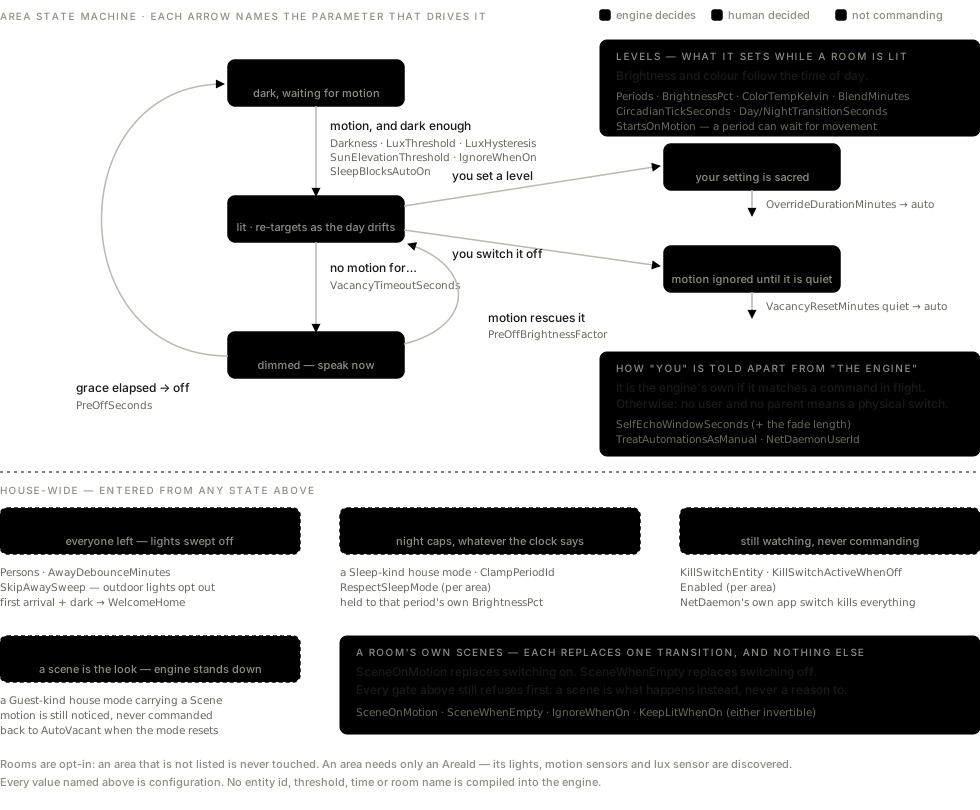
The rooms, drawn
Section titled “The rooms, drawn”Each arrow names the setting that drives it.
When something is wrong
Section titled “When something is wrong”- A room that cannot be resolved is skipped and the rest keep running. The message names the real ids.
- A problem with the document itself stops the engine commanding anything and posts a Home Assistant notification listing every problem. The Configuration page keeps working, which is where you fix it.
- Settings survive a redeploy. The live configuration file lives outside the deploy folder, and the previous version is kept beside it.